
We built and open-sourced a fashion storefront where shoppers describe what they want in simple language, watch an AI agent search the catalog in real time, virtually try on anything before buying, and get a fully rebrandable admin layer underneath. Below: the idea, what we built, and how it's put together.
.png)
The Idea
We kept running into the same complaint about buying clothes online: you already know exactly what you want, and the site still makes you translate it into a category, a size filter, a color swatch, and a price slider before it'll show you anything. None of that maps to how anyone actually describes what they're looking for "something for a friend's wedding, nothing too flashy, under two thousand" isn't a set of checkboxes, it's a sentence. That gap is what turned into a real question worth answering: what does a storefront look like if the primary way to shop is a conversation, not a filter tree?
We mean something specific by that. Not a chat widget in the corner of a normal site, a store where an AI agent is the interface, on-site in our own build, and increasingly off-site too, as shoppers start asking general-purpose assistants they already trust to find and buy things on their behalf. Either way, the questions that used to live in a human's head while they browsed "does this come in my size," "is this okay for a wedding," "what goes with this" now have to be answered by something reading data, not glancing at a hero image.
So we built one, open-sourced it, and called it Agentic Storefront. It's live at Ionio-agenticstorefront, and built to be forked and rebranded in an afternoon, not integrated over a sprint.
None of this got built by chasing every AI feature we could think of. There's no search bar sitting next to the chat, on purpose if the agent can't find something, the shopper shouldn't be able to route around it through a filter menu, because that's effectively admitting the agent failed. Product grids, category pages, and checkout are solved problems, so we barely touched them and put the design effort into the one part that was actually new. An AI that just hands you an answer feels like a black box; one you can watch as it searches, card by card, feels like it's actually looking for something so making that process visible ended up mattering more than making it fast. And the whole thing had to survive someone cloning the repo with nothing set up: no database, no account, no prior session, and the core experience still had to work the first time it loaded.
.png)
What we Built
The whole surface area is deliberately small: a chat window, a cart drawer, a try-on widget, an admin portal. Nothing else competes for attention.
Conversational Discovery
No filters, no drop downs. You type what you want or tap a suggested prompt and the agent parses occasion, budget, style, and category out of one sentence instead of five form fields.
We seeded the empty chat state with concrete, tappable prompts: "Ethnic wear under ₹1,500," "Suggest a complete office outfit," "Find a dress for a party." A blank input box is intimidating most people don't know what an AI stylist can actually do, so they either type something too vague or nothing at all. One tap solves both problems: it produces a real result immediately, and it teaches the agent's range without a single instruction screen.
.png)
Watching it Search
This is the single UX decision we'd defend hardest. Product cards stream in one at a time over Server-Sent Events as the agent searches the catalog, instead of a loading indicator followed by a wall of results all at once.
A loading spinner communicates nothing. Cards arriving one at a time show the agent considering one option, then another, instead of handing over five items with no sense of how they were chosen and that's most of what separates a helpful assistant from a search bar with extra latency.
.png)
Virtual Try-on
Upload a photo, and within roughly 30–40 seconds you see yourself wearing the selected garment, via an image-editing model called through a dedicated endpoint rather than inline in the chat loop. That separation matters: a 30–40 second render doesn't belong in the same request path as a text response that should feel instant.
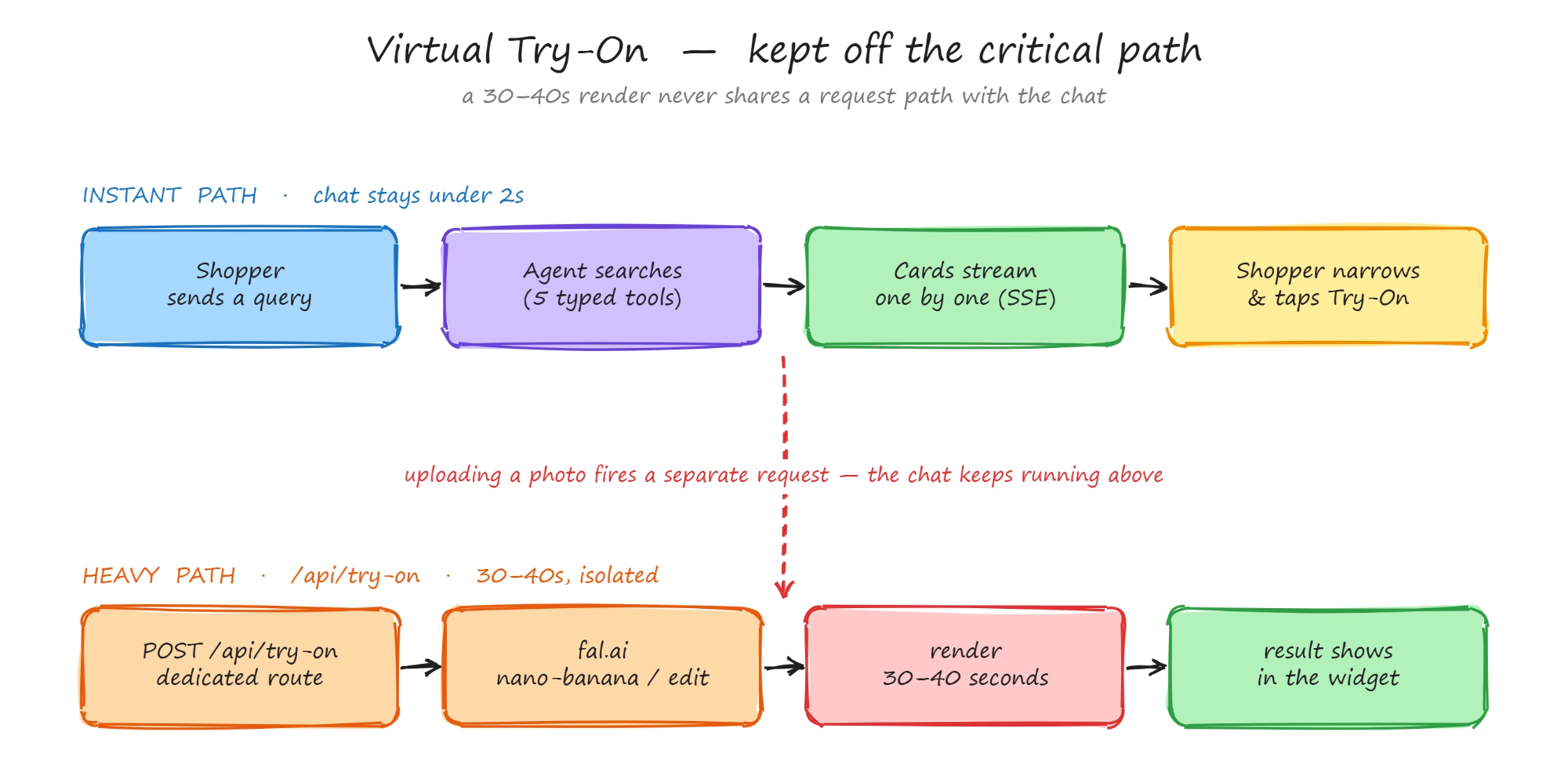
Virtual try-on runs off the critical path: the chat loop stays instant while a separate /api/try-on request calls fal.ai and takes 30–40 seconds to render, so the slow step never blocks the conversation.
We also treat try-on as a deliberate, on-demand step rather than something offered by default on every product. Uploading a photo is a bigger ask than tapping a suggested prompt, so it only surfaces once you've narrowed down to something specific the interface earns the right to ask for a photo by first proving it found something worth trying on.
.png)
Outfit Building
The agent doesn't just return single items. Asked for a party dress, it can also suggest the shoes or the jacket that would go with it, using a separate tool built specifically for this it takes the product you're already looking at plus a style constraint (casual, formal, festive, party) rather than trying to cram outfit logic into the general search call. That's what turns the agent from a search function into something closer to an actual stylist: it's reasoning about what pairs with a specific item, not matching keywords to a product title a second time.
Ask "what would go with this?" on a product and you get two or three complementary pieces back, not more of the same category the kind of suggestion a shop assistant makes without being asked twice.
.png)
Personalization
Two systems quietly shape what a shopper sees, and neither requires creating an account. In-session behavior tracking watches hover time, whether someone scrolled a product page, and which sizes they tap all in sessionStorage, nothing sent to a server. After three meaningful signals, it starts re-ranking the product grid: product-type matches score +3, color matches +2, price proximity +1, items already seen −1. A persistent style profile sizes, fit, budget, favorite colors, recent searches lives in localStorage and syncs to /api/style-profile a few seconds after each change, then gets formatted straight into the agent's context ("usual size in tops: L · budget ₹5,000–15,000") so a returning shopper doesn't have to restate their size on every visit.
It's local-first by design. Short-lived interaction signals remain entirely inside sessionStorage, while longer-term preferences live in localStorage and periodically synchronize to the backend for persistence when available. Separating transient behavior from persistent preferences lets us personalize immediately without requiring authentication, while still keeping the agent's context grounded in structured user preferences instead of reconstructing them from every conversation.
This is one of the newest layers in the product. We're actively testing, refining, and improving it before relying on it more extensively.
The Cart
In a chat-first flow, it's easy to lose track of what's actually in your bag if three items get added across a conversation and nothing visibly reacts, you stop trusting the system. So the cart lives in a slide-out drawer, open and visible next to the conversation, updating live the moment the agent adds something. Watching an item land in the bag as it's recommended closes the loop between talking and buying.
.png)
Checkout
A full cash-on-delivery order flow with address validation sits at the end of the funnel, inside the same interface because dropping the shopper into a generic, disconnected checkout at the last second breaks the one continuous conversation the rest of the product is built around.
It's deliberately unambitious: no payment gateway to integrate, no redirect to a different domain, just a form that validates the address before the order confirms. The goal wasn't to make checkout interesting. It was to make sure the last step doesn't contradict the ten minutes of conversation that got the shopper there.
.png)
The Admin Panel
This is what turns Agentic Storefront from a one-off showcase into something forkable: brand name, tagline, agent persona, and catalog are all editable live from /admin, with changes taking effect in about 15 seconds - no redeploy, no code change.
Getting a real catalog in works two ways, both from /admin/catalog. Paste a live Shopify store URL and hit "Scan & Preview" it fetches the store's category and product-type hierarchy first and shows you a checklist, so you choose which categories to bring in rather than importing the whole store blind, with an option to replace the existing catalog outright instead of merging into it. Or upload a Shopify products.json export directly, capped at 500 products per file; the parser validates the format before anything touches the live catalog and reports back exactly what landed product count, storage used, page count if the import spanned multiple batches. Either path reads Shopify's catalog structure only, not its checkout nothing about payments or order infrastructure is touched. Rename the agent, rewrite its persona, point it at your catalog, and you have your own storefront without opening the codebase.
.png)
.png)
How It's Built
At a high level, the architecture is intentionally simple: a Next.js frontend, Claude Sonnet as the reasoning layer, typed tools for deterministic operations, and MongoDB as an persistence layer.
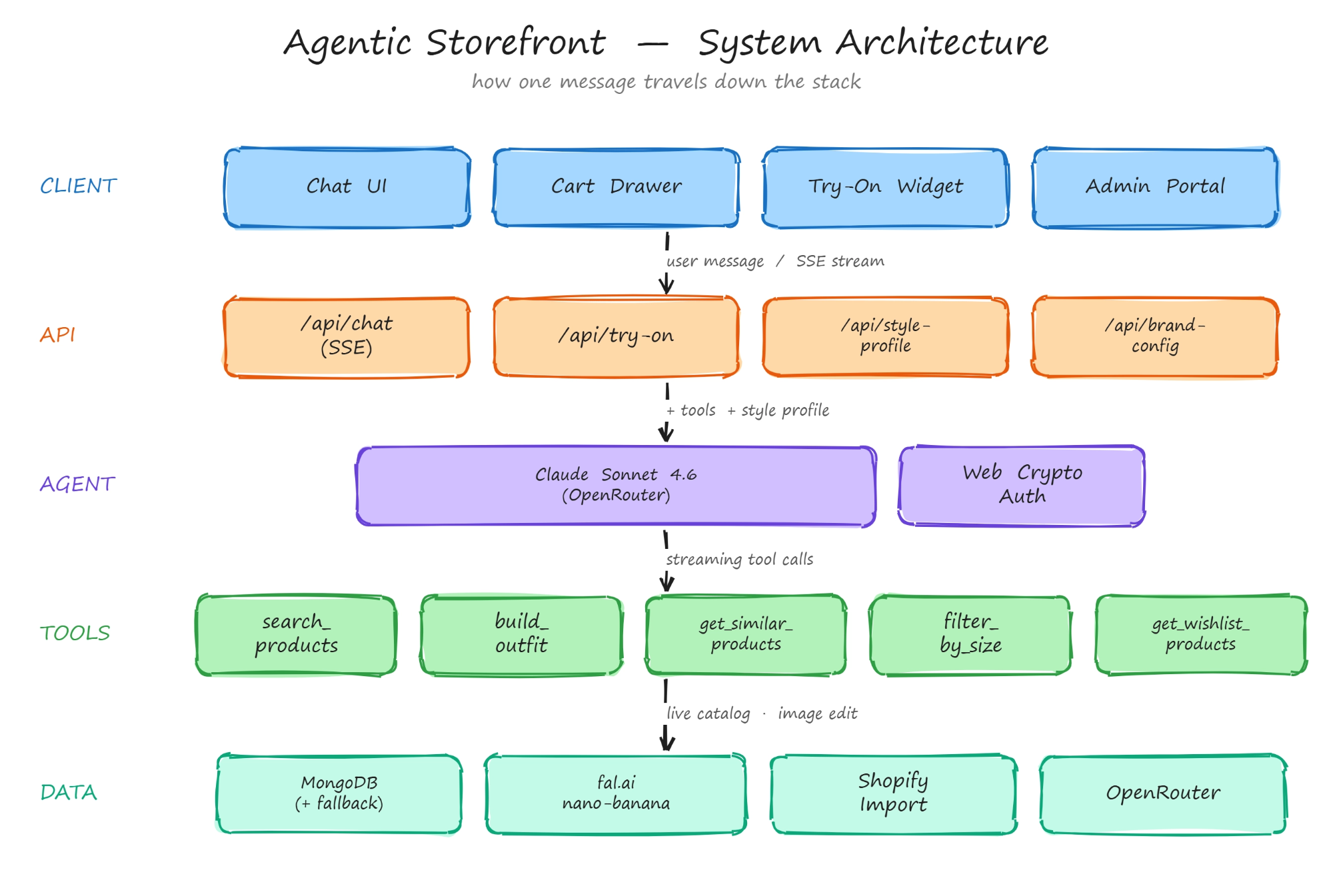
System architecture: how a shopper's message flows through the stack — the browser and its local-first state, the Next.js API routes, Claude Sonnet 4.6 as the reasoning layer, the five typed tools, and the MongoDB + external services underneath.
A typical request follows a simple execution loop. The user's message is sent to Claude Sonnet 4.6 along with the current conversation, the shopper's style profile (when available), and the tool definitions. Rather than generating product recommendations directly, the model first decides which tool to invoke. Tool results stream back immediately to the UI over Server-Sent Events, while the model continues generating its natural-language response. Additional tool calls such as outfit building or size filtering can happen within the same turn before the final reply is completed.
The agent doesn't receive one generic search(query) function. Instead, every capability is exposed as a separate, strongly typed tool with a constrained schema: search_products, build_outfit, get_similar_products, filter_by_size, and get_wishlist_products. We started with a single flexible search tool, but under real conversations the model would regularly lose constraints from earlier turns dropping a requested size, treating "not too formal" as a product category, or ignoring a budget limit. Breaking the functionality into narrow tools shifted more responsibility from prompt interpretation into deterministic software, making multi-turn conversations substantially more reliable.
.png)
By the Numbers
Not vanity metrics the actual thresholds that shape how the product feels:
What's working
Streaming cards and the always-visible cart mattered more than we expected going in. They're the two moments a shopper actually watches the results arriving, the bag updatingand it turned out those two moments, more than the chat replies themselves, are what convince someone the agent is real. The graceful-degradation choice paid off just as fast: because nothing critical depends on MongoDB, forking the repo gets you a fully working storefront in minutes, with zero database setup, which matters a lot for something meant to be evaluated cold rather than integrated over a sprint. And the tool-schema decision from the backend section above earned its keep in practice it's the reason the agent has been trustworthy enough to demo without crossing our fingers on every query.
What's next
Personalization is the one we're actively rebuilding on, not just watching.
The behavior-tracking and style-profile systems described above are already implemented and running in production, and we're actively testing and refining them using real shopper interactions. Current work focuses on validating the weighting of behavioral signals, determining the most effective thresholds for personalization, and measuring how profile summaries influence the agent's recommendations. As we gather more usage data, we'll continue tuning these mechanisms based on real customer behavior rather than initial assumptions. Another area of ongoing development is enabling the style profile to seamlessly follow shoppers across devices without requiring a login, which will be introduced once the single-device experience has been fully validated and optimized.
Chat and browse still feel like two separate apps.
Start a conversation, jump into the full product grid to compare a couple of things, and the context built up in chat doesn't carry over into the grid or back out. Fixing that means sharing state between the two surfaces instead of treating them as parallel, disconnected entry points into the same catalog the next real project, not a nice-to-have we'll get to eventually.
Try-on is the one place "instant" breaks.
Everything else in the experience feels immediate; a 30–40 second render is the one moment that doesn't. It's isolated to its own endpoint so it can't block the rest of the chat, which was the right call for correctness, but it's still the clearest gap between an impressive demo and a product people are willing to sit through closing it means either a faster underlying model or a better way to keep the shopper engaged with something else while it renders.
Three infrastructure choices haven't been stress-tested past demo traffic.
Streaming ties up a server function for the length of a search, which is fine at the traffic a demo gets but becomes a real cost once more than a handful of shoppers are searching at once a serverless route holding a connection open per active conversation is the first thing we'd profile before pushing this beyond a template. And catalog import handles the failures we anticipated, like malformed JSON or an unreachable store URL, but hasn't been thrown at an unusually large or oddly structured Shopify catalog yet, so the 500-product cap is a ceiling we've tested for, not one we've guaranteed for every store shape.
Try it
Agentic Storefront is open-source. Clone it and run it with the static demo catalog, no database required, or upgrade to MongoDB when you need persistence. Live at Ionio-agenticstorefron.
If you're building a shopping agent and you're at the point of wiring up your first search tool, here's the one piece of advice worth taking: give it a narrow, typed schema instead of one flexible free-text parameter. It's a smaller change than it sounds like, and it's the one that made the rest of this system trustworthy enough to demo without crossing our fingers.
Work with us
We help retail and e-commerce teams ship production AI: conversational shopping agents, virtual try-on, catalog and search infrastructure, and the deployment architecture that holds all of it together once a demo has to become something customers actually use every day. Agentic Storefront is our own answer to what that looks like end to end, built the same way we'd build it for a client including the parts we're honest about not having finished yet. If you're building something similar and want a team that takes production as seriously as the demo, we'd love to hear from you.