Best Virtual Try-On AI Models Compared (2026): CatVTON vs Kling vs FASHN vs Qwen vs Nano Banana - Part 1

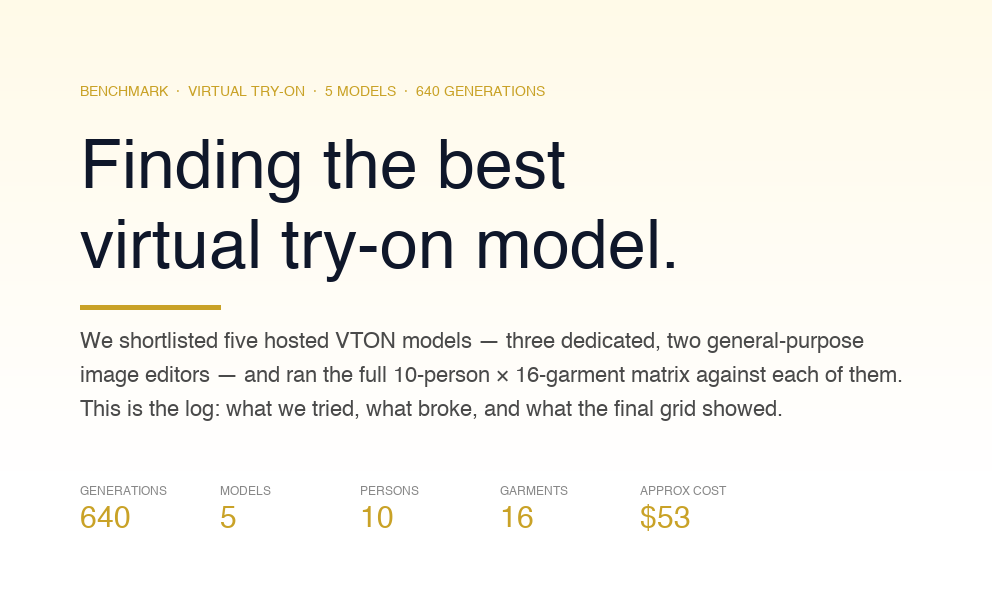
We tested five leading AI virtual try-on models — Kling, FASHN, CatVTON, Qwen, and Nano Banana Pro — across 160 real-world outfit combinations. This benchmark explores pose preservation, fabric realism, identity retention, API failures, recovery workflows, costs, and production readiness to determine which virtual try-on models actually perform best in practical retail scenarios.

May 12, 2026

Best Virtual Try-On AI Models Compared (2026): CatVTON vs Kling vs FASHN vs Qwen vs Nano Banana - Part 1

May 12, 2026
5 min

Virtual try-on is one of those capabilities that looks solved on the marketing page and stops looking solved the moment you try to ship it. There's a dedicated VTON model for every occasion — CatVTON, FASHN, Kling, IDM-VTON, Leffa — and on top of that, a new wave of frontier image editors like Qwen and Google's Nano Banana Pro that claim they can do VTON just fine with a well-worded prompt. Every one of them will hand you a crisp hero image when you upload a studio photo and a flat-lay t-shirt. None of them tell you what happens with a sitting pose, a silk slipdress, a five-hundred-pixel product thumbnail, or a graphic print that needs to stay legible across a body.

We wanted to know which of these actually holds up across a real matrix, so we built one. Ten people, sixteen garments, five models, everything running on hosted inference — no self-hosted GPUs, no fine-tuning. The kind of setup a retail team would use if they were adding a try-on feature next sprint.

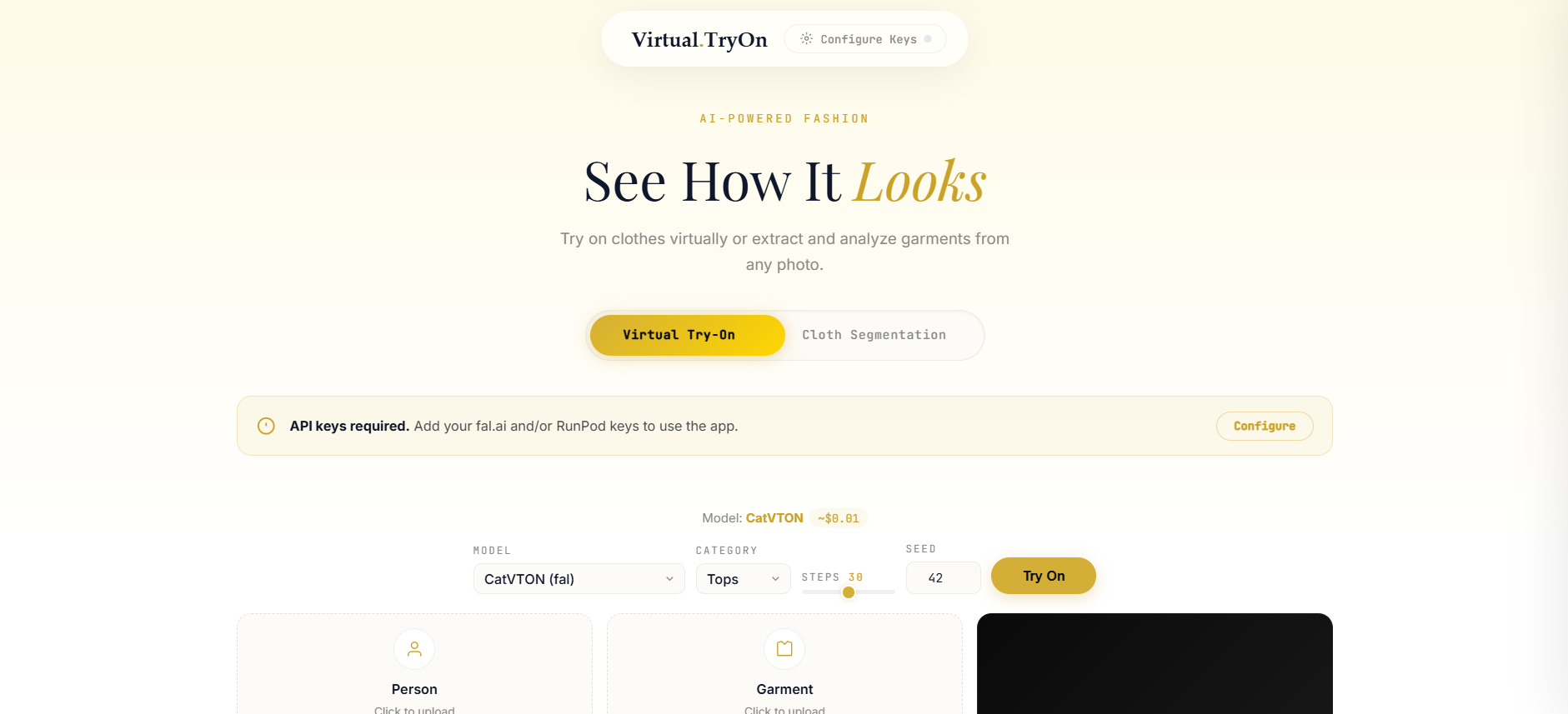
If you want to try these models on your own images before reading the rest, we've put up a live demo at Ionio Virtual Try On and the Repo — same five endpoints, upload your own person + garment, see what each model does in real time.

This post is the log. It's about what we tried, what broke, and what the results actually show.

The shortlist

We ended up with five models, split across two categories:

Dedicated virtual try-on models:

- CatVTON — purpose-built VTON model, runs on fal.ai serverless

- Kling (Kolors variant) — dedicated VTON model from Kwai, runs on fal.ai

- FASHN VTON 1.5 — dedicated VTON model, deployed on a RunPod serverless worker (not available in the fal catalogue)

General-purpose image editors (tested for VTON):

- Qwen Image Max Edit — Alibaba's frontier image editor, runs on fal.ai

- Nano Banana Pro — Google's Gemini 2.5 Flash Image behind a fal.ai endpoint; not technically a VTON model, but prompt-driven editing might produce more natural composites than traditional inpainting pipelines

We thought the dedicated models would win on fidelity and the general editors would win on flexibility. That hypothesis turned out to be directionally right but more nuanced than we expected — and every model surprised us in at least one place before the run was done.

The dataset

Ten people. Five men, five women. The cast was deliberately mixed: three front-facing shots, a couple of side profiles, two back views, one sitting pose, one full-body, one studio portrait. Different backgrounds, different lighting, different skin tones. None of them are synthetic — they’re all real stock photos with the usual cluttered realities like a beach behind the athlete or a gray office chair behind the businessman. That was the point. We didn’t want controlled studio conditions. Here is the link to the dataset : Tryon Dataset
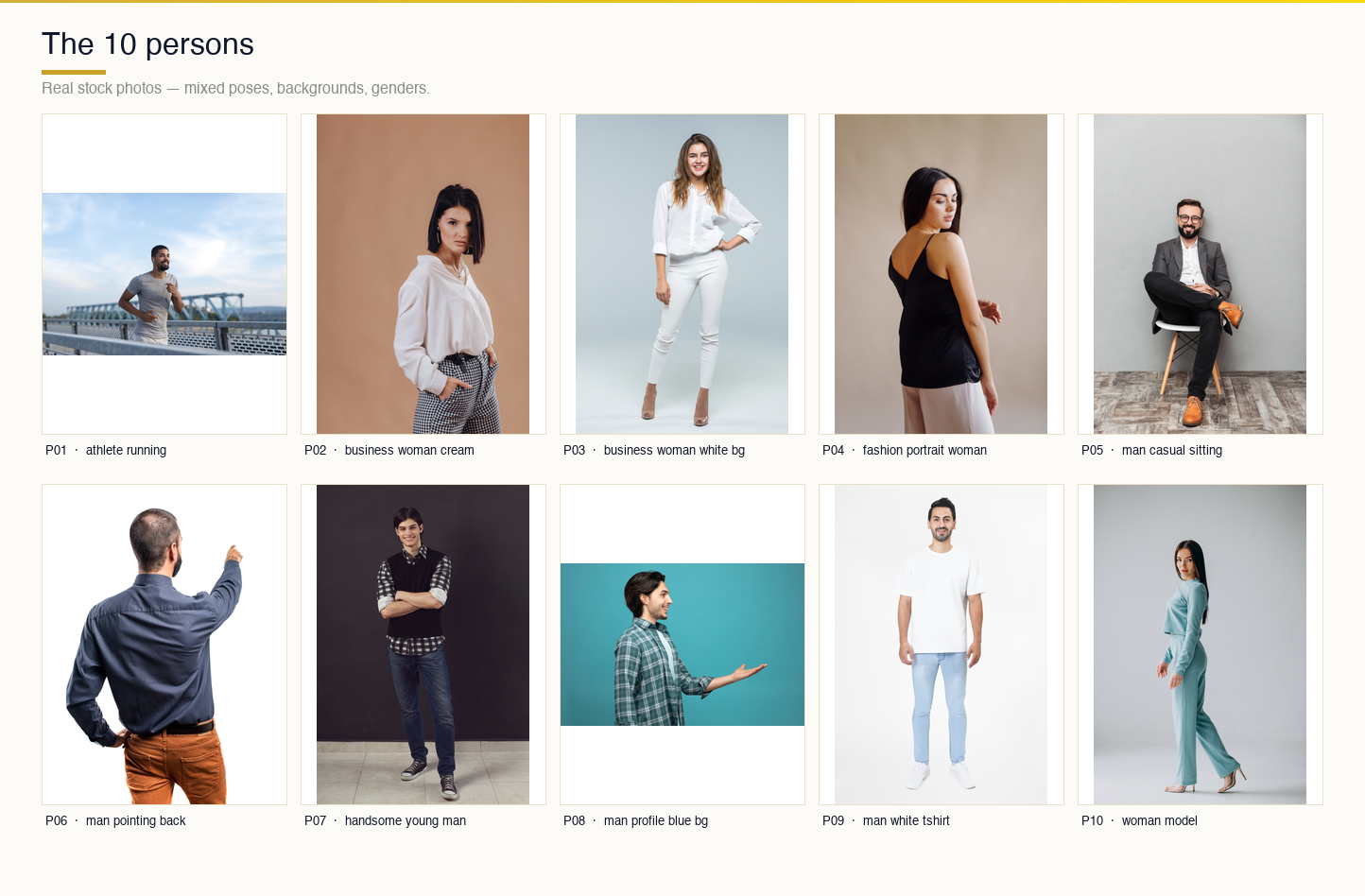
The ten persons

Sixteen garments. The tops, bottoms, and one-pieces you’d expect — a Dolce & Gabbana button-up, denim shorts, patchwork jeans, a maxi skirt. Plus a handful of curveballs that would tell us where each model’s guardrails actually sit: a silk slipdress, a sequin gown, a Snoopy cardigan with a high-contrast graphic print, a traditional sherwani that came in at 500 × 500 pixels, a woolen overcoat that was only 375 × 500, and a generic Adobe Stock image at 360 × 360. The tiny images weren’t a bug — we wanted to see what would happen when we pushed product imagery that wasn’t perfect.

The sixteen garments

Every pair in the benchmark has a deterministic name: person_NN_descriptor__garment_NN_descriptor.png. Boring, but when you’re debugging 640 generations across five models and three output folders, being able to glance at a filename and immediately know which cell it is saves hours. Naming discipline in a benchmark is the kind of thing you under-invest in at the start and regret by day two.

How we structured the runs

The architecture is almost embarrassingly simple, and we kept it that way on purpose. For each model, one Python script, around twenty lines of actual logic. All the tedious machinery — image upload, min/max-side resize, request construction, response polling, cost and status logging, skip-if-exists on re-runs — lives in a shared vton_common.py that every script imports. A per-model script only has to declare its endpoint, its request payload shape, and its per-call cost estimate. The rest is inherited.

vton-benchmark-package/
├── vton_common.py
├── run_catvton.py
├── run_kling.py
├── run_qwen.py
├── run_nano_banana_pro.py
├── run_fashn_runpod.py
├── persons/                 (10 .jpg)
├── garments/                (16 .jpg)
└── results/
    ├── catvton/
    ├── kling/
    ├── qwen/
    ├── fashn/
    └── nano_banana_pro/

There’s a run_all.sh that fires off all four fal runners in parallel — each one pipes its output to its own log file and writes results to its own subfolder. FASHN runs separately because RunPod is its own universe. Re-runs automatically skip any pair that already has a PNG in the output directory, which is how you want recovery to work when you’re 160 calls into a batch, something random 5xx’s, and the terminal you were watching has scrolled past the error.

We started with a single monolithic runner that tried to dispatch all five models through one process. Two hours in we realized that was a mistake — a single rate-limit or 429 from one model would interrupt the whole batch, and debugging one model’s quirks meant re-reading code that was handling four other models’ quirks at the same time. Splitting into per-model scripts meant we could iterate on Qwen’s image-size problems without touching anything Kling was doing. Boring infrastructure, saved us three debugging sessions later in the project.

Deploying FASHN on RunPod

FASHN VTON 1.5 isn't on fal.ai's catalogue, so we deployed it ourselves as a RunPod serverless worker. Here's what the endpoint configuration looks like:

A quick guide to what each setting means:

- Active workers — Workers that stay running at all times to reduce response latency. We set this to 0 (pay-per-request mode). For a benchmark run that's not latency-sensitive, there's no reason to pay for idle time. In production, you'd keep at least 1 active to eliminate cold starts.

- GPU count — Number of GPUs allocated per worker. 1 GPU per worker is sufficient for FASHN VTON 1.5.

- Idle timeout — How long a worker stays alive after processing its last request before shutting down. Set to 5 seconds here. Workers continue to incur charges until the idle timeout expires and they're marked idle — so this directly impacts your per-run cost.

- Enable execution timeout — A toggle to cap how long any single request can run. We left this enabled as a safety net on unattended batch runs.

- Execution timeout — The hard maximum in seconds a request can run after a worker picks it up. Set to 600 seconds (10 minutes) — generous for a try-on model, but you want this ceiling when running unattended batch jobs so a stuck request doesn't hold the worker indefinitely.

- Enable FlashBoot — Reduces the majority of cold-starts down to ~2 seconds, even for large models. Enabled. Worth turning on, but test your output quality after enabling — it can occasionally affect determinism.

- Model — The Hugging Face model ID or link the worker will serve. Paste the FASHN VTON 1.5 path here before deploying.

Where it broke

Here’s where the project stopped feeling like a clean execution and started feeling like actual engineering. We hit four distinct failure modes. Each one taught us something, either about the model, about the hosted platform, or about our own assumptions.

Qwen has a minimum image size, and we weren’t thinking about it

The first Qwen batch went out and came back with a mix of clean successes and thirty nearly-identical failures that all had the same error payload:

{
  "loc": ["body", "image_urls", 1],
  "msg": "Image dimensions are too small. Minimum dimensions are 512x512 pixels.",
  "type": "image_too_small",
  "ctx": {
    "min_height": 512,
    "min_width": 512
  }
}

The index-1 part was the giveaway — image_urls[1] is the garment slot, not the person. We opened the file listing and saw it: garment_14_sherwani_mens.jpg was a 500 × 500 JPG pulled straight from a product catalogue. garment_15_overcoat_woolen.jpg was 375 × 500. garment_16_generic_adobe.jpg was 360 × 360. Qwen’s input validator politely draws a line at 512 and our pre-processing step wasn’t respecting it.

The actual bug was conceptual. Our prepared_image helper had a MAX_SIDE of 2048 — which matters, because fal’s larger-image validator caps there — but no corresponding floor. We were down-scaling aggressively and never considering the case where an image was already small. Thirty failures happen when an API is strict in one direction and your pre-processing only cares about the other.

The fix was to add an optional min_side parameter and upscale with Lanczos when the shorter dimension dropped below it:

def prepared_image(path: Path, min_side: int = None) -> Path:
    im = Image.open(path)
    w, h = im.size

    if min_side and min(w, h) < min_side:
        scale = min_side / min(w, h)
        im = im.convert("RGB").resize(
            (int(w * scale), int(h * scale)),
            Image.LANCZOS
        )

    # ... existing max-side downscale logic ...

We picked 640 as the min-side rather than 512, reasoning that sitting exactly on the threshold was likely to bite us again the first time fal tightened the validator or the first time a garment came in at 510. Six-forty cleared the floor with margin and didn’t noticeably degrade the input.

Three of the thirty failures cleared immediately. The rest followed. The whole Qwen recovery for this category was under two minutes once the upload path was fixed.

FASHN doesn’t know what a “dress” is

The FASHN runs were going fine until they weren’t. Every pair with a top or a bottom succeeded. Then the gowns and slipdresses came through and every single one of the twenty dress/slipdress pairs failed with exactly the same error:

FAILED: 'NoneType' object is not iterable

That’s a crash inside the RunPod handler, not a validation error. We thought at first that our images were broken — maybe corrupted JPEG, maybe a transparency layer somewhere. But the same images ran fine through the other four models. So we started looking at the FASHN API spec.

FASHN takes a category parameter. Our inference logic, lifted straight from how CatVTON talks about the same concept, mapped gowns and slipdresses to "dresses". This felt obvious and also turned out to be wrong. FASHN v1.5’s actual API expects "one-pieces". When we sent "dresses", the model returned None because it didn’t know what to do with the category string, and the RunPod handler — which was written assuming any successful model run returns an iterable — crashed trying to iterate the empty output. Hence the NoneType error that was really a category mismatch wearing a trenchcoat.

Three character change:

CATEGORY_MAP = {
    "tops":       {"shirt", "tshirt", "longsleeve", ...},
    "bottoms":    {"pants", "shorts", "jeans", "skirt"},
    "one-pieces": {"gown", "slipdress", "dress"},
}

All twenty failures were actually the same one failure replicated twenty times. This is the kind of bug you only find by reading the model’s API documentation instead of the related-but-different model’s API documentation. Lesson archived.

RunPod cold-starts look exactly like bugs

We re-ran all twenty FASHN dress pairs with the corrected "one-pieces" category at concurrency 3. Seventeen succeeded cleanly. Three failed — and they failed with the same 'NoneType' object is not iterable error we’d just supposedly fixed.

The pattern was immediate: the three failures were the first three submissions in the batch. After that, everything worked. The last seventeen never saw the error. Every fourth submission and beyond got clean output.

That’s a RunPod serverless cold-start, textbook. When a submission hits a freshly-provisioned worker, the container is still loading FASHN’s model weights into GPU memory. The handler accepts the request, starts running, hits the inference call before the model is actually ready, and produces None. The error message we saw wasn’t really the model’s voice — it was the handler’s panic signal, unchanged from the category-mapping bug because that same None output took the same crash path.

We didn’t add retry logic. We just re-ran the script at --concurrency 1 to force sequential submissions against the now-warm worker. All three cleared on the first attempt. The skip-if-exists logic we’d built from the start meant we didn’t have to remember which three were missing — the script rediscovered them from the output folder state and only targeted those. Total recovery cost: about a minute.

The lesson is less about RunPod specifically and more about how easy it is to misattribute errors when two unrelated failure modes produce the same textual symptom. We spent ten minutes genuinely confused about why the “fix” hadn’t worked before we noticed the failures clustered on the first three jobs in the batch. That clustering was the tell.

Nano Banana Pro’s content filter is more interesting than it looks

The last model was supposed to be the easiest. Nano Banana Pro is Google’s Gemini 2.5 Flash Image behind a fal endpoint — a general editor, massive training data, widely documented. We expected it to breeze through everything and maybe wobble on some edge cases.

What we didn’t expect was for it to politely refuse five specific pairs. The error was always the same shape:

PROMPT_CHAIN = [
    ("primary",
     "Create a realistic fashion try-on image using the clothing item from image 2 "
     "on the person shown in image 1. Preserve facial identity, pose, lighting, "
     "and background while generating a natural outfit appearance."),

    ("editorial",
     "Professional editorial fashion photo of the subject from image 1 styled with "
     "the apparel from image 2. Maintain the original environment and identity."),

    ("neutral",
     "Generate a fashion visualization where the subject from image 1 is wearing "
     "the clothing item shown in image 2."),

    ("minimal",
     "Fashion try-on image using image 1 and image 2."),
]

The five pairs clustered: four of them were combinations of the silk slipdress with different persons, and the fifth was a swim-shorts pair. Gemini’s safety classifier was interpreting the request — a photograph of a clothed person plus a revealing or silky garment plus an instruction to “put this garment on this person” — as a potentially unsafe content request. The prompt we were using was deliberately generic: “Put the garment from image 2 onto the person in image 1. Keep the person’s face, body shape, pose, and background exactly the same. Only replace their clothing.” Technically clinical. Still blocked.

There are two ways to respond to a safety filter that’s over-triggering. The uninteresting way is to give up on those pairs and note the gap in the results. The more interesting way is to notice that safety filters are classifiers, classifiers have soft decision boundaries, and the same semantic request phrased differently will land on different sides of that boundary.

We built a prompt chain — the primary prompt, then an “editorial” variant that framed the task as a fashion photograph, then a more neutral technical wording, then a minimal last-resort phrasing. On a block, we’d retry with the next variant:

PROMPT_CHAIN = [
    ("primary",   "Put the garment from image 2 onto the person in image 1. "
                  "Keep the person's face, body shape, pose, and background "
                  "exactly the same. Only replace their clothing."),

    ("editorial", "Editorial fashion photograph: the person from image 1 "
                  "wearing the clothing item shown in image 2. Preserve "
                  "identity, pose, lighting, and background."),

    ("neutral",   "Image editing task: replace the outfit in image 1 with "
                  "the apparel item from image 2."),

    ("minimal",   "Apply the clothing item from image 2 to the subject in image 1."),
]

Every single one of the slipdress retries passed on the editorial variant. Reframing the task as a fashion photograph, rather than as an instruction to dress someone, pushed the classifier’s decision the other way — same input images, same semantic outcome, different phrasing, clear pass. The four outputs we got back are in the final grid and are, honestly, among the cleanest results Nano Banana Pro produced in the entire benchmark.

This is an observation worth holding onto: when a safety filter blocks a legitimate task, the right move is often not to argue about policy but to re-represent the task in a way that the classifier’s feature space responds to. We’re not evading — we’re routing around the false positive. Models get better at this, but today, prompt rewording is a valid tool.hit

What the grid shows

The clearest way to see the models side-by-side is to hold a pair constant and look across the row:
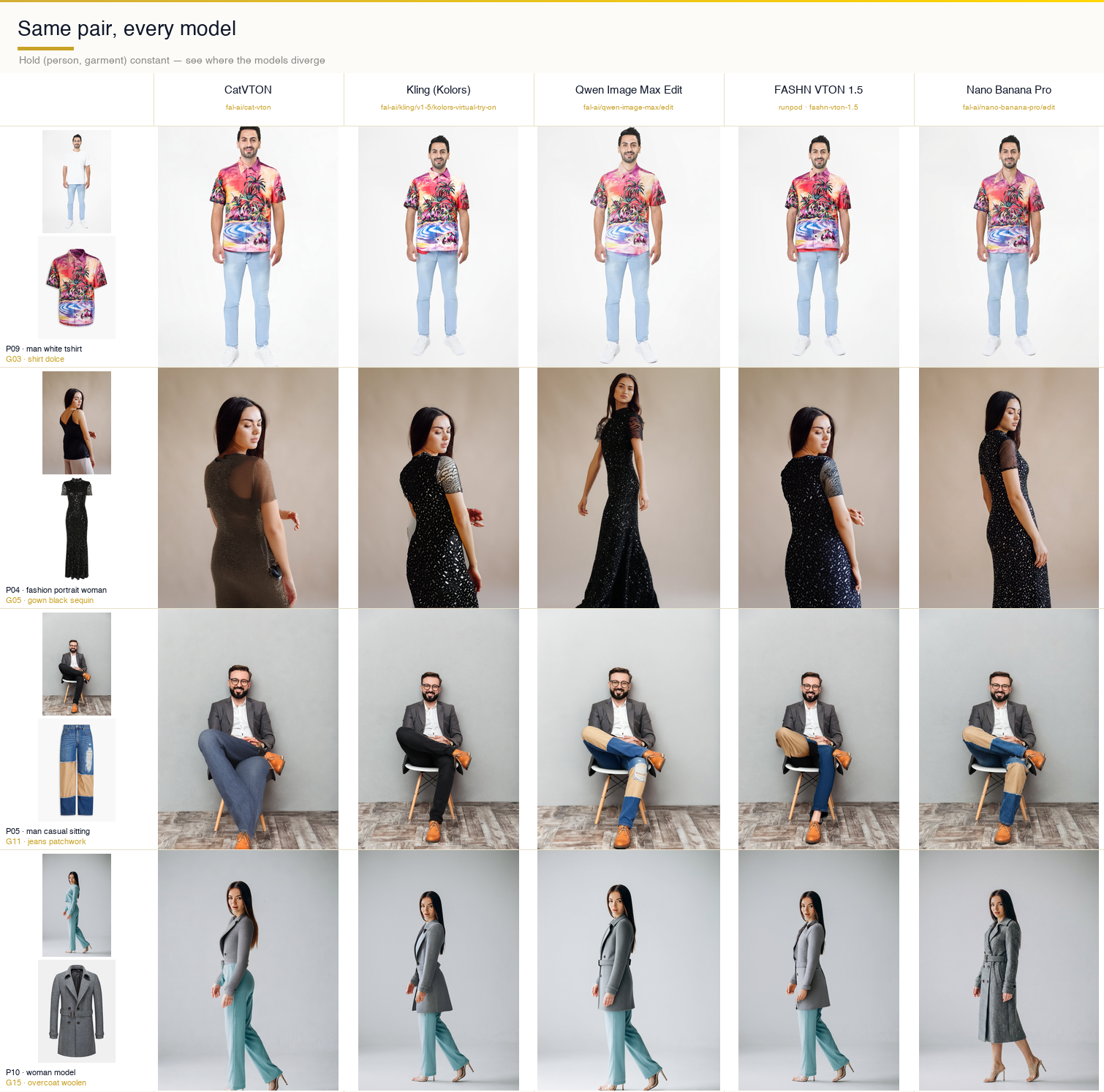
Comparison strip

Row one — a white-t-shirt man trying on a printed Dolce shirt — is the simple case. Every model handles it. Kling’s composite is the cleanest and most photographic. Qwen produces a slightly more stylized version. CatVTON adds small fabric wrinkles that weren’t in the source garment. FASHN is tighter on the drape. Nano Banana Pro subtly shifts skin tone and changes the jean proportions — small edits, but they add up to a composite that feels off if you stare at it.

Row two — the fashion portrait with a sequin gown — is the hard case. FASHN nails the sequin texture. Nano Banana Pro holds onto enough of the sparkle to read as sequins. CatVTON flattens the fabric into something that looks painted. Kling replaces the background with a studio gradient and reshapes the gown’s silhouette. Qwen produces a clean black dress that has lost most of the sequin information.

Row three — the sitting man with patchwork jeans — is the pose-preservation check. CatVTON is the only model that keeps the sit. Kling stands him up. Qwen stands him up. FASHN keeps the sit but loses the patchwork pattern. Nano Banana Pro keeps everything and subtly warps the shoe proportions. If you’re building a feature where users try on clothes in non-standard poses, this row is the one that would dictate your model choice.

Row four — the woman-model with a woolen overcoat — is the outerwear test. Kling keeps the original body proportions tightest. FASHN stretches the coat. Nano Banana Pro reframes the entire shot, which is either a creative feature or a bug depending on your use case.

The full 10 × 16 per-model grids

Each model’s full 160-cell matrix is below. One image per model, all ten persons as rows, all sixteen garments as columns. Read top-to-bottom for a given garment to see how that model handles different bodies, backgrounds, and poses. Read left-to-right for a given person to see how it handles different fabrics and categories.

CatVTON’s grid is the most internally consistent. Every cell looks like it came from the same pipeline. The weakness is fabric — its composites flatten interesting textures into plausible-looking but generic surfaces. Kling’s grid is the most photographic, which is what you want for hero shots and product photography, but it’s the most willing to change things beyond the garment — backgrounds drift, proportions get adjusted, sometimes the lighting changes. Qwen’s grid is oddly stylized in a way that reads as editorial at best and as uncanny at worst. FASHN’s grid is the best on one-pieces and the best on sequin/silk fabrics, genuinely. Nano Banana Pro’s grid has the highest variance — some of the best cells in the entire benchmark sit alongside some of the most off-script ones, cell for cell.

Numbers

We ran 640 total generations across five models — 160 pairs per model. Cost landed around fifty-three dollars all in.

- Kling — roughly $11 across 160 calls at ~$0.07 each; the most expensive per-call, but the fastest to run (~45 minutes wall time for the full batch)

- FASHN — around $13 because RunPod bills on GPU-seconds; dress-category cold starts added measurable wall time

- CatVTON — $8–10, bottlenecked mostly by single-threaded execution on our end rather than the API (~2.5 hours wall time)

- Qwen — $8–10, took a couple of hours; slower than Kling but cheaper per call

- Nano Banana Pro — cheapest at around $6.40; every safety-blocked primary prompt ate several minutes before returning its rejection, and those minutes compounded across the batch

Final success rates: 100% for CatVTON, Kling, Qwen, and FASHN. Nano Banana Pro finished at 99.4% — one pair short because we made an editorial decision to stop pursuing a safety-filter false positive that had already demonstrated its pattern clearly.

Per-model verdicts

If you're picking one model to ship, there isn't a clean winner. Each of the five is better than the others at something specific.

CatVTON — Best for unusual poses

The only model you can trust to preserve a non-standard pose. If your users might try on clothes while sitting, lying down, or in any position other than a standard standing portrait, CatVTON is the only option that keeps them there. The trade-off: it flattens interesting fabrics and misses texture detail on complex garments like sequins or silk.

Kling — Best for identity preservation

Faces, hair, skin texture — Kling's outputs drift the least from the source person. This is the model to pick if your product surface makes users sensitive to looking like themselves in the output. The trade-off: it's the most willing to change backgrounds and adjust body proportions in ways that break the illusion of a direct try-on.

FASHN — Best for one-pieces and complex fabrics

Sequins, silk, heavy outerwear — FASHN nails the drape and keeps the material legible better than any other model here. It's tight on fit in a way that reads as "runway photograph" rather than "you wearing this dress," but that tightness may be a feature depending on what you're marketing. Trade-off: it has the most opaque failure modes — when it breaks, it breaks with crashes that require reading API docs to interpret.

Nano Banana Pro — Best for creative flexibility

The best model at everything *except* being a strict virtual try-on model. Its grid has both the best individual cells in the entire benchmark and the most off-script ones. If you need flexibility — different lighting, different framing, editorial shoots — this is what you reach for. If you need strict pose-and-background preservation, it will let you down often enough to matter.

Qwen Image Max Edit — Best balanced default

The most balanced middle ground. Clean composites on easy pairs. Weaker on complex poses and dramatic garments. Cheaper than most of the alternatives. A good default for a standardised catalogue where the inputs are predictable.

No single winner. A thoughtful production system would route by garment category and pose — Kling or Qwen for standing tops, FASHN for one-pieces, CatVTON as the fallback whenever the pose deviates from standard. The infrastructure to build that routing layer on top of these five models is a couple of hundred lines of Python and a fal key. The hard part is the benchmark that tells you which model to route each case to — which is what this exercise was.

Reproducing this

Everything in the benchmark is in a folder with relative paths. Setup is a three-command sequence:

cd vton-benchmark-package
python3 -m venv .venv && source .venv/bin/activate
pip install -r requirements.txt

export FAL_KEY="..."                     # for the four fal models
export RP_EP="..." RP_KEY="..."          # for FASHN on RunPod

python run_kling.py --test               # smoke test, one pair, ~30 sec
python run_kling.py --all                # full 160 pairs

./run_all.sh --all                       # all four fal models in parallel

python run_fashn_runpod.py --all         # FASHN on RunPod (runs separately)

Each script writes to its own results/{model}/ subfolder, its own run_log_{model}.jsonl line-delimited record, and its own summary JSON at the end. The skip-if-exists default means you can interrupt any run and re-execute the same command to pick up where you left off. If a recovery is needed, the rerun_missing_{model}.py scripts diff the folder against a reference and run only the missing pairs — no manual tracking of what’s already done.

What we’d do next

A few obvious directions. First, quantitative metrics. We’ve been talking about this grid in qualitative terms because that’s how you actually look at VTON output in practice, but LPIPS, FID, and CLIP-score across the full matrix would give us a defensible per-model ranking on pose preservation, identity drift, and garment fidelity as separate dimensions rather than as one subjective gestalt.

Second, human evaluation. Two or three reviewers independently rating each cell on a simple rubric — is the garment right, is the person recognizable, would this ship — would give us inter-subjective agreement that automated metrics don’t. For VTON specifically, the subjective judgment is the metric.

Third, category-aware routing. Build a small orchestrator on top of the five models that picks one per garment category based on what this benchmark showed. Top → Kling or Qwen. One-piece → FASHN. Unusual pose → CatVTON. Creative → Nano Banana Pro. Fall back to a secondary if the primary fails. That orchestrator would outperform any single model in the benchmark on the full matrix, and it’s the shape of what a production VTON feature actually wants.

Fourth, extend to the models we skipped. Leffa, IDM-VTON, OOTDiffusion — we scoped those out to keep this run tight, but they’re all plausible additions to the routing layer, and running the same matrix against them would be incremental work once the infrastructure is in place.

If you’re evaluating VTON models for a production feature, the honest advice is: pick two. One dedicated VTON model to handle your majority-case garments, and one prompt-driven editor to handle the long tail of cases where the dedicated model breaks. The cost of running both in parallel is low. The cost of not having a fallback is a feature that works on your demo reel and fails in production.

Try it yourself

We put the full benchmark behind a simple Vercel-hosted UI. Upload your own person photo and a garment image, pick a model, see the result in seconds. All five endpoints are live: Ionio Virtual Tryon
Work with us

This benchmark came out of an actual client engagement — we needed to pick a VTON stack for a retail feature, couldn’t find an honest head-to-head anywhere, and built our own. That kind of work is what we do at Ionio.

We help retail and e-commerce teams ship production AI — everything from virtual try-on and product photography pipelines to custom evaluation rigs like this one. If you’re building an AI feature and want a team that takes measurement as seriously as the demo, we’d love to hear from you.

Book a call with Ionio

Create Fast — Impress Instantly

Transform Your Business with AI Solutions

Ready to scale with AI? Get a personalized strategy session with our AI experts. Discover how to automate, optimize, and accelerate your business growth.

BOOK A CALL

Book an AI consultation

Looking to build AI solutions? Let's chat.

Schedule your consultation today - this not a sales call, feel free to come prepared with your technical queries.

You'll be meeting Rohan Sawant, the Founder.
 Company
Book a Call

Let us help you.

Thank you! Your submission has been received!
Oops! Something went wrong while submitting the form.

Behind the Blog

Ellendula Sai Manideep
Writer

Manideep is a Machine Learning Engineer at Ionio

Pranav Patel
Editor

Good boi. He is a good boi & does ML/AI. AI Lead.

Best Virtual Try-On AI Models Compared (2026): CatVTON vs Kling vs FASHN vs Qwen vs Nano Banana - Part 1

Read Time:
minutes

Virtual try-on is one of those capabilities that looks solved on the marketing page and stops looking solved the moment you try to ship it. There's a dedicated VTON model for every occasion — CatVTON, FASHN, Kling, IDM-VTON, Leffa — and on top of that, a new wave of frontier image editors like Qwen and Google's Nano Banana Pro that claim they can do VTON just fine with a well-worded prompt. Every one of them will hand you a crisp hero image when you upload a studio photo and a flat-lay t-shirt. None of them tell you what happens with a sitting pose, a silk slipdress, a five-hundred-pixel product thumbnail, or a graphic print that needs to stay legible across a body.

We wanted to know which of these actually holds up across a real matrix, so we built one. Ten people, sixteen garments, five models, everything running on hosted inference — no self-hosted GPUs, no fine-tuning. The kind of setup a retail team would use if they were adding a try-on feature next sprint.

If you want to try these models on your own images before reading the rest, we've put up a live demo at Ionio Virtual Try On and the Repo — same five endpoints, upload your own person + garment, see what each model does in real time.

This post is the log. It's about what we tried, what broke, and what the results actually show.

The shortlist

We ended up with five models, split across two categories:

Dedicated virtual try-on models:

- CatVTON — purpose-built VTON model, runs on fal.ai serverless

- Kling (Kolors variant) — dedicated VTON model from Kwai, runs on fal.ai

- FASHN VTON 1.5 — dedicated VTON model, deployed on a RunPod serverless worker (not available in the fal catalogue)

General-purpose image editors (tested for VTON):

- Qwen Image Max Edit — Alibaba's frontier image editor, runs on fal.ai

- Nano Banana Pro — Google's Gemini 2.5 Flash Image behind a fal.ai endpoint; not technically a VTON model, but prompt-driven editing might produce more natural composites than traditional inpainting pipelines

We thought the dedicated models would win on fidelity and the general editors would win on flexibility. That hypothesis turned out to be directionally right but more nuanced than we expected — and every model surprised us in at least one place before the run was done.

The dataset

Ten people. Five men, five women. The cast was deliberately mixed: three front-facing shots, a couple of side profiles, two back views, one sitting pose, one full-body, one studio portrait. Different backgrounds, different lighting, different skin tones. None of them are synthetic — they’re all real stock photos with the usual cluttered realities like a beach behind the athlete or a gray office chair behind the businessman. That was the point. We didn’t want controlled studio conditions. Here is the link to the dataset : Tryon Dataset

The ten persons

Sixteen garments. The tops, bottoms, and one-pieces you’d expect — a Dolce & Gabbana button-up, denim shorts, patchwork jeans, a maxi skirt. Plus a handful of curveballs that would tell us where each model’s guardrails actually sit: a silk slipdress, a sequin gown, a Snoopy cardigan with a high-contrast graphic print, a traditional sherwani that came in at 500 × 500 pixels, a woolen overcoat that was only 375 × 500, and a generic Adobe Stock image at 360 × 360. The tiny images weren’t a bug — we wanted to see what would happen when we pushed product imagery that wasn’t perfect.

The sixteen garments

Every pair in the benchmark has a deterministic name: person_NN_descriptor__garment_NN_descriptor.png. Boring, but when you’re debugging 640 generations across five models and three output folders, being able to glance at a filename and immediately know which cell it is saves hours. Naming discipline in a benchmark is the kind of thing you under-invest in at the start and regret by day two.

How we structured the runs

The architecture is almost embarrassingly simple, and we kept it that way on purpose. For each model, one Python script, around twenty lines of actual logic. All the tedious machinery — image upload, min/max-side resize, request construction, response polling, cost and status logging, skip-if-exists on re-runs — lives in a shared vton_common.py that every script imports. A per-model script only has to declare its endpoint, its request payload shape, and its per-call cost estimate. The rest is inherited.

vton-benchmark-package/
├── vton_common.py
├── run_catvton.py
├── run_kling.py
├── run_qwen.py
├── run_nano_banana_pro.py
├── run_fashn_runpod.py
├── persons/                 (10 .jpg)
├── garments/                (16 .jpg)
└── results/
    ├── catvton/
    ├── kling/
    ├── qwen/
    ├── fashn/
    └── nano_banana_pro/

There’s a run_all.sh that fires off all four fal runners in parallel — each one pipes its output to its own log file and writes results to its own subfolder. FASHN runs separately because RunPod is its own universe. Re-runs automatically skip any pair that already has a PNG in the output directory, which is how you want recovery to work when you’re 160 calls into a batch, something random 5xx’s, and the terminal you were watching has scrolled past the error.

We started with a single monolithic runner that tried to dispatch all five models through one process. Two hours in we realized that was a mistake — a single rate-limit or 429 from one model would interrupt the whole batch, and debugging one model’s quirks meant re-reading code that was handling four other models’ quirks at the same time. Splitting into per-model scripts meant we could iterate on Qwen’s image-size problems without touching anything Kling was doing. Boring infrastructure, saved us three debugging sessions later in the project.

Deploying FASHN on RunPod

FASHN VTON 1.5 isn't on fal.ai's catalogue, so we deployed it ourselves as a RunPod serverless worker. Here's what the endpoint configuration looks like:

A quick guide to what each setting means:

- Active workers — Workers that stay running at all times to reduce response latency. We set this to 0 (pay-per-request mode). For a benchmark run that's not latency-sensitive, there's no reason to pay for idle time. In production, you'd keep at least 1 active to eliminate cold starts.

- GPU count — Number of GPUs allocated per worker. 1 GPU per worker is sufficient for FASHN VTON 1.5.

- Idle timeout — How long a worker stays alive after processing its last request before shutting down. Set to 5 seconds here. Workers continue to incur charges until the idle timeout expires and they're marked idle — so this directly impacts your per-run cost.

- Enable execution timeout — A toggle to cap how long any single request can run. We left this enabled as a safety net on unattended batch runs.

- Execution timeout — The hard maximum in seconds a request can run after a worker picks it up. Set to 600 seconds (10 minutes) — generous for a try-on model, but you want this ceiling when running unattended batch jobs so a stuck request doesn't hold the worker indefinitely.

- Enable FlashBoot — Reduces the majority of cold-starts down to ~2 seconds, even for large models. Enabled. Worth turning on, but test your output quality after enabling — it can occasionally affect determinism.

- Model — The Hugging Face model ID or link the worker will serve. Paste the FASHN VTON 1.5 path here before deploying.

Where it broke

Here’s where the project stopped feeling like a clean execution and started feeling like actual engineering. We hit four distinct failure modes. Each one taught us something, either about the model, about the hosted platform, or about our own assumptions.

Qwen has a minimum image size, and we weren’t thinking about it

The first Qwen batch went out and came back with a mix of clean successes and thirty nearly-identical failures that all had the same error payload:

{
  "loc": ["body", "image_urls", 1],
  "msg": "Image dimensions are too small. Minimum dimensions are 512x512 pixels.",
  "type": "image_too_small",
  "ctx": {
    "min_height": 512,
    "min_width": 512
  }
}

The index-1 part was the giveaway — image_urls[1] is the garment slot, not the person. We opened the file listing and saw it: garment_14_sherwani_mens.jpg was a 500 × 500 JPG pulled straight from a product catalogue. garment_15_overcoat_woolen.jpg was 375 × 500. garment_16_generic_adobe.jpg was 360 × 360. Qwen’s input validator politely draws a line at 512 and our pre-processing step wasn’t respecting it.

The actual bug was conceptual. Our prepared_image helper had a MAX_SIDE of 2048 — which matters, because fal’s larger-image validator caps there — but no corresponding floor. We were down-scaling aggressively and never considering the case where an image was already small. Thirty failures happen when an API is strict in one direction and your pre-processing only cares about the other.

The fix was to add an optional min_side parameter and upscale with Lanczos when the shorter dimension dropped below it:

def prepared_image(path: Path, min_side: int = None) -> Path:
    im = Image.open(path)
    w, h = im.size

    if min_side and min(w, h) < min_side:
        scale = min_side / min(w, h)
        im = im.convert("RGB").resize(
            (int(w * scale), int(h * scale)),
            Image.LANCZOS
        )

    # ... existing max-side downscale logic ...

We picked 640 as the min-side rather than 512, reasoning that sitting exactly on the threshold was likely to bite us again the first time fal tightened the validator or the first time a garment came in at 510. Six-forty cleared the floor with margin and didn’t noticeably degrade the input.

Three of the thirty failures cleared immediately. The rest followed. The whole Qwen recovery for this category was under two minutes once the upload path was fixed.

FASHN doesn’t know what a “dress” is

The FASHN runs were going fine until they weren’t. Every pair with a top or a bottom succeeded. Then the gowns and slipdresses came through and every single one of the twenty dress/slipdress pairs failed with exactly the same error:

FAILED: 'NoneType' object is not iterable

That’s a crash inside the RunPod handler, not a validation error. We thought at first that our images were broken — maybe corrupted JPEG, maybe a transparency layer somewhere. But the same images ran fine through the other four models. So we started looking at the FASHN API spec.

FASHN takes a category parameter. Our inference logic, lifted straight from how CatVTON talks about the same concept, mapped gowns and slipdresses to "dresses". This felt obvious and also turned out to be wrong. FASHN v1.5’s actual API expects "one-pieces". When we sent "dresses", the model returned None because it didn’t know what to do with the category string, and the RunPod handler — which was written assuming any successful model run returns an iterable — crashed trying to iterate the empty output. Hence the NoneType error that was really a category mismatch wearing a trenchcoat.

Three character change:

CATEGORY_MAP = {
    "tops":       {"shirt", "tshirt", "longsleeve", ...},
    "bottoms":    {"pants", "shorts", "jeans", "skirt"},
    "one-pieces": {"gown", "slipdress", "dress"},
}

All twenty failures were actually the same one failure replicated twenty times. This is the kind of bug you only find by reading the model’s API documentation instead of the related-but-different model’s API documentation. Lesson archived.

RunPod cold-starts look exactly like bugs

We re-ran all twenty FASHN dress pairs with the corrected "one-pieces" category at concurrency 3. Seventeen succeeded cleanly. Three failed — and they failed with the same 'NoneType' object is not iterable error we’d just supposedly fixed.

The pattern was immediate: the three failures were the first three submissions in the batch. After that, everything worked. The last seventeen never saw the error. Every fourth submission and beyond got clean output.

That’s a RunPod serverless cold-start, textbook. When a submission hits a freshly-provisioned worker, the container is still loading FASHN’s model weights into GPU memory. The handler accepts the request, starts running, hits the inference call before the model is actually ready, and produces None. The error message we saw wasn’t really the model’s voice — it was the handler’s panic signal, unchanged from the category-mapping bug because that same None output took the same crash path.

We didn’t add retry logic. We just re-ran the script at --concurrency 1 to force sequential submissions against the now-warm worker. All three cleared on the first attempt. The skip-if-exists logic we’d built from the start meant we didn’t have to remember which three were missing — the script rediscovered them from the output folder state and only targeted those. Total recovery cost: about a minute.

The lesson is less about RunPod specifically and more about how easy it is to misattribute errors when two unrelated failure modes produce the same textual symptom. We spent ten minutes genuinely confused about why the “fix” hadn’t worked before we noticed the failures clustered on the first three jobs in the batch. That clustering was the tell.

Nano Banana Pro’s content filter is more interesting than it looks

The last model was supposed to be the easiest. Nano Banana Pro is Google’s Gemini 2.5 Flash Image behind a fal endpoint — a general editor, massive training data, widely documented. We expected it to breeze through everything and maybe wobble on some edge cases.

What we didn’t expect was for it to politely refuse five specific pairs. The error was always the same shape:

PROMPT_CHAIN = [
    ("primary",
     "Create a realistic fashion try-on image using the clothing item from image 2 "
     "on the person shown in image 1. Preserve facial identity, pose, lighting, "
     "and background while generating a natural outfit appearance."),

    ("editorial",
     "Professional editorial fashion photo of the subject from image 1 styled with "
     "the apparel from image 2. Maintain the original environment and identity."),

    ("neutral",
     "Generate a fashion visualization where the subject from image 1 is wearing "
     "the clothing item shown in image 2."),

    ("minimal",
     "Fashion try-on image using image 1 and image 2."),
]

The five pairs clustered: four of them were combinations of the silk slipdress with different persons, and the fifth was a swim-shorts pair. Gemini’s safety classifier was interpreting the request — a photograph of a clothed person plus a revealing or silky garment plus an instruction to “put this garment on this person” — as a potentially unsafe content request. The prompt we were using was deliberately generic: “Put the garment from image 2 onto the person in image 1. Keep the person’s face, body shape, pose, and background exactly the same. Only replace their clothing.” Technically clinical. Still blocked.

There are two ways to respond to a safety filter that’s over-triggering. The uninteresting way is to give up on those pairs and note the gap in the results. The more interesting way is to notice that safety filters are classifiers, classifiers have soft decision boundaries, and the same semantic request phrased differently will land on different sides of that boundary.

We built a prompt chain — the primary prompt, then an “editorial” variant that framed the task as a fashion photograph, then a more neutral technical wording, then a minimal last-resort phrasing. On a block, we’d retry with the next variant:

PROMPT_CHAIN = [
    ("primary",   "Put the garment from image 2 onto the person in image 1. "
                  "Keep the person's face, body shape, pose, and background "
                  "exactly the same. Only replace their clothing."),

    ("editorial", "Editorial fashion photograph: the person from image 1 "
                  "wearing the clothing item shown in image 2. Preserve "
                  "identity, pose, lighting, and background."),

    ("neutral",   "Image editing task: replace the outfit in image 1 with "
                  "the apparel item from image 2."),

    ("minimal",   "Apply the clothing item from image 2 to the subject in image 1."),
]

Every single one of the slipdress retries passed on the editorial variant. Reframing the task as a fashion photograph, rather than as an instruction to dress someone, pushed the classifier’s decision the other way — same input images, same semantic outcome, different phrasing, clear pass. The four outputs we got back are in the final grid and are, honestly, among the cleanest results Nano Banana Pro produced in the entire benchmark.

This is an observation worth holding onto: when a safety filter blocks a legitimate task, the right move is often not to argue about policy but to re-represent the task in a way that the classifier’s feature space responds to. We’re not evading — we’re routing around the false positive. Models get better at this, but today, prompt rewording is a valid tool.hit

What the grid shows

The clearest way to see the models side-by-side is to hold a pair constant and look across the row:

Comparison strip

Row one — a white-t-shirt man trying on a printed Dolce shirt — is the simple case. Every model handles it. Kling’s composite is the cleanest and most photographic. Qwen produces a slightly more stylized version. CatVTON adds small fabric wrinkles that weren’t in the source garment. FASHN is tighter on the drape. Nano Banana Pro subtly shifts skin tone and changes the jean proportions — small edits, but they add up to a composite that feels off if you stare at it.

Row two — the fashion portrait with a sequin gown — is the hard case. FASHN nails the sequin texture. Nano Banana Pro holds onto enough of the sparkle to read as sequins. CatVTON flattens the fabric into something that looks painted. Kling replaces the background with a studio gradient and reshapes the gown’s silhouette. Qwen produces a clean black dress that has lost most of the sequin information.

Row three — the sitting man with patchwork jeans — is the pose-preservation check. CatVTON is the only model that keeps the sit. Kling stands him up. Qwen stands him up. FASHN keeps the sit but loses the patchwork pattern. Nano Banana Pro keeps everything and subtly warps the shoe proportions. If you’re building a feature where users try on clothes in non-standard poses, this row is the one that would dictate your model choice.

Row four — the woman-model with a woolen overcoat — is the outerwear test. Kling keeps the original body proportions tightest. FASHN stretches the coat. Nano Banana Pro reframes the entire shot, which is either a creative feature or a bug depending on your use case.

The full 10 × 16 per-model grids

Each model’s full 160-cell matrix is below. One image per model, all ten persons as rows, all sixteen garments as columns. Read top-to-bottom for a given garment to see how that model handles different bodies, backgrounds, and poses. Read left-to-right for a given person to see how it handles different fabrics and categories.

CatVTON’s grid is the most internally consistent. Every cell looks like it came from the same pipeline. The weakness is fabric — its composites flatten interesting textures into plausible-looking but generic surfaces. Kling’s grid is the most photographic, which is what you want for hero shots and product photography, but it’s the most willing to change things beyond the garment — backgrounds drift, proportions get adjusted, sometimes the lighting changes. Qwen’s grid is oddly stylized in a way that reads as editorial at best and as uncanny at worst. FASHN’s grid is the best on one-pieces and the best on sequin/silk fabrics, genuinely. Nano Banana Pro’s grid has the highest variance — some of the best cells in the entire benchmark sit alongside some of the most off-script ones, cell for cell.

Numbers

We ran 640 total generations across five models — 160 pairs per model. Cost landed around fifty-three dollars all in.

- Kling — roughly $11 across 160 calls at ~$0.07 each; the most expensive per-call, but the fastest to run (~45 minutes wall time for the full batch)

- FASHN — around $13 because RunPod bills on GPU-seconds; dress-category cold starts added measurable wall time

- CatVTON — $8–10, bottlenecked mostly by single-threaded execution on our end rather than the API (~2.5 hours wall time)

- Qwen — $8–10, took a couple of hours; slower than Kling but cheaper per call

- Nano Banana Pro — cheapest at around $6.40; every safety-blocked primary prompt ate several minutes before returning its rejection, and those minutes compounded across the batch

Final success rates: 100% for CatVTON, Kling, Qwen, and FASHN. Nano Banana Pro finished at 99.4% — one pair short because we made an editorial decision to stop pursuing a safety-filter false positive that had already demonstrated its pattern clearly.

Per-model verdicts

If you're picking one model to ship, there isn't a clean winner. Each of the five is better than the others at something specific.

CatVTON — Best for unusual poses

The only model you can trust to preserve a non-standard pose. If your users might try on clothes while sitting, lying down, or in any position other than a standard standing portrait, CatVTON is the only option that keeps them there. The trade-off: it flattens interesting fabrics and misses texture detail on complex garments like sequins or silk.

Kling — Best for identity preservation

Faces, hair, skin texture — Kling's outputs drift the least from the source person. This is the model to pick if your product surface makes users sensitive to looking like themselves in the output. The trade-off: it's the most willing to change backgrounds and adjust body proportions in ways that break the illusion of a direct try-on.

FASHN — Best for one-pieces and complex fabrics

Sequins, silk, heavy outerwear — FASHN nails the drape and keeps the material legible better than any other model here. It's tight on fit in a way that reads as "runway photograph" rather than "you wearing this dress," but that tightness may be a feature depending on what you're marketing. Trade-off: it has the most opaque failure modes — when it breaks, it breaks with crashes that require reading API docs to interpret.

Nano Banana Pro — Best for creative flexibility

The best model at everything *except* being a strict virtual try-on model. Its grid has both the best individual cells in the entire benchmark and the most off-script ones. If you need flexibility — different lighting, different framing, editorial shoots — this is what you reach for. If you need strict pose-and-background preservation, it will let you down often enough to matter.

Qwen Image Max Edit — Best balanced default

The most balanced middle ground. Clean composites on easy pairs. Weaker on complex poses and dramatic garments. Cheaper than most of the alternatives. A good default for a standardised catalogue where the inputs are predictable.

No single winner. A thoughtful production system would route by garment category and pose — Kling or Qwen for standing tops, FASHN for one-pieces, CatVTON as the fallback whenever the pose deviates from standard. The infrastructure to build that routing layer on top of these five models is a couple of hundred lines of Python and a fal key. The hard part is the benchmark that tells you which model to route each case to — which is what this exercise was.

Reproducing this

Everything in the benchmark is in a folder with relative paths. Setup is a three-command sequence:

cd vton-benchmark-package
python3 -m venv .venv && source .venv/bin/activate
pip install -r requirements.txt

export FAL_KEY="..."                     # for the four fal models
export RP_EP="..." RP_KEY="..."          # for FASHN on RunPod

python run_kling.py --test               # smoke test, one pair, ~30 sec
python run_kling.py --all                # full 160 pairs

./run_all.sh --all                       # all four fal models in parallel

python run_fashn_runpod.py --all         # FASHN on RunPod (runs separately)

Each script writes to its own results/{model}/ subfolder, its own run_log_{model}.jsonl line-delimited record, and its own summary JSON at the end. The skip-if-exists default means you can interrupt any run and re-execute the same command to pick up where you left off. If a recovery is needed, the rerun_missing_{model}.py scripts diff the folder against a reference and run only the missing pairs — no manual tracking of what’s already done.

What we’d do next

A few obvious directions. First, quantitative metrics. We’ve been talking about this grid in qualitative terms because that’s how you actually look at VTON output in practice, but LPIPS, FID, and CLIP-score across the full matrix would give us a defensible per-model ranking on pose preservation, identity drift, and garment fidelity as separate dimensions rather than as one subjective gestalt.

Second, human evaluation. Two or three reviewers independently rating each cell on a simple rubric — is the garment right, is the person recognizable, would this ship — would give us inter-subjective agreement that automated metrics don’t. For VTON specifically, the subjective judgment is the metric.

Third, category-aware routing. Build a small orchestrator on top of the five models that picks one per garment category based on what this benchmark showed. Top → Kling or Qwen. One-piece → FASHN. Unusual pose → CatVTON. Creative → Nano Banana Pro. Fall back to a secondary if the primary fails. That orchestrator would outperform any single model in the benchmark on the full matrix, and it’s the shape of what a production VTON feature actually wants.

Fourth, extend to the models we skipped. Leffa, IDM-VTON, OOTDiffusion — we scoped those out to keep this run tight, but they’re all plausible additions to the routing layer, and running the same matrix against them would be incremental work once the infrastructure is in place.

If you’re evaluating VTON models for a production feature, the honest advice is: pick two. One dedicated VTON model to handle your majority-case garments, and one prompt-driven editor to handle the long tail of cases where the dedicated model breaks. The cost of running both in parallel is low. The cost of not having a fallback is a feature that works on your demo reel and fails in production.

Try it yourself

We put the full benchmark behind a simple Vercel-hosted UI. Upload your own person photo and a garment image, pick a model, see the result in seconds. All five endpoints are live: Ionio Virtual Tryon

Work with us

This benchmark came out of an actual client engagement — we needed to pick a VTON stack for a retail feature, couldn’t find an honest head-to-head anywhere, and built our own. That kind of work is what we do at Ionio.

We help retail and e-commerce teams ship production AI — everything from virtual try-on and product photography pipelines to custom evaluation rigs like this one. If you’re building an AI feature and want a team that takes measurement as seriously as the demo, we’d love to hear from you.

Book a call with Ionio